Set up PHP 8 on Windows in about ten minutes, add it to your PATH and run your first script from the command line.
Table of contents
PHP runs a big part of the web, including WordPress. Getting it running on Windows takes about ten minutes. This guide installs PHP 8, adds it to the PATH and runs a first script.
Step 1: Download PHP
- Go to windows.php.net/download.
- Under the latest PHP 8 release, download the x64 Thread Safe zip file.
The Thread Safe build also works with Apache later. If you only plan to use PHP from the command line, either build is fine.
Step 2: Extract it
Create a folder called C:\php and extract the zip into it. You should see php.exe directly inside C:\php, not inside another folder.
Step 3: Create php.ini
PHP comes with two sample settings files. Copy the development one:
cd C:\php
copy php.ini-development php.ini
Open php.ini in Notepad. To turn on an extension, remove the ; at the start of its line. Most projects need these:
extension=curl
extension=mbstring
extension=openssl
extension=pdo_mysql
Step 4: Add PHP to the PATH
- Press Win and search for environment variables.
- Open Edit the system environment variables and click Environment Variables.
- Under System variables, select Path, click Edit, then New, and add
C:\php. - Click OK on every window.
Step 5: Test it
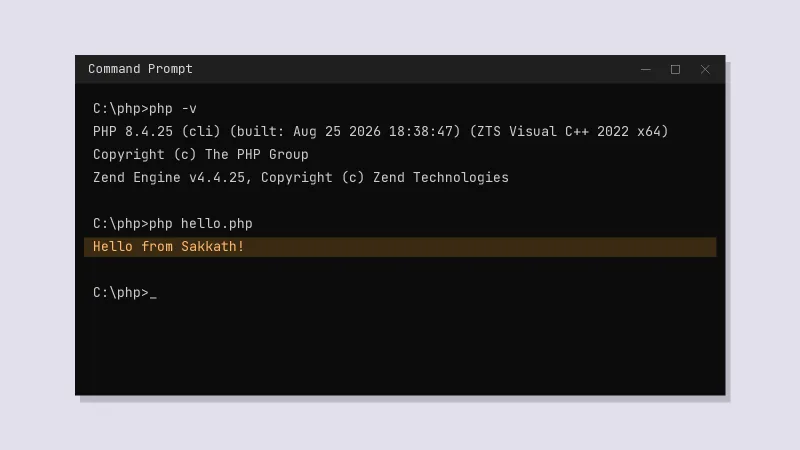
Open a new Command Prompt (an already open one won't see the PATH change) and run:
php -vIf you see a version number, PHP is installed. Now make a file called hello.php:
<?php
$name = 'Sakkath';
echo "Hello from $name!" . PHP_EOL;
Run it with php hello.php and you should see the greeting.
What to try next
- Run
php -S localhost:8000inside a folder to start a small local web server - Install Composer to add PHP packages to your projects
- If you also need MySQL and Apache, a bundle like XAMPP sets everything up at once