Processor names, RAM, SSD, nits. What matters when you buy a laptop for study, office work or coding, and what you can ignore.
Table of contents
Laptop listings throw a lot of numbers at you. Some matter a lot, others barely at all. This guide is for study, office work, coding and everyday use. Gaming laptops are a different story.
Processor
A mid-range chip is enough for most people:
- Intel: Core i5 or Core Ultra 5 and above
- AMD: Ryzen 5 and above
- Apple: any M-series MacBook
Skip entry-level chips like Intel Celeron and Pentium if you want the laptop to stay quick for a few years.
RAM
- 8 GB is fine only for browsing and documents.
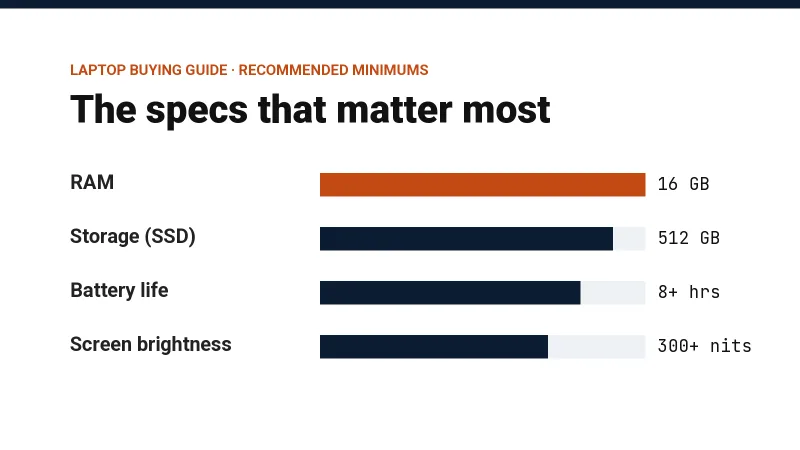
- 16 GB is the right amount for most people in 2026, especially if you keep many tabs open, code or edit photos.
- 32 GB makes sense for heavy video editing, 3D work or virtual machines.
On many thin laptops the RAM is soldered and cannot be upgraded later, so buy enough now.
Storage
Always pick an SSD. A laptop with a hard disk (HDD) feels slow from day one. 512 GB is a sensible minimum, because 256 GB fills up quickly once Windows updates and a few apps are installed.
Screen
- Resolution: Full HD (1920 × 1080) or higher
- Panel: IPS or OLED for good colours and viewing angles
- Brightness: 300 nits is fine indoors. Aim for 400 nits if you often sit near a window.
Battery
Ignore the "up to 15 hours" on the box. Read reviews that test normal use, and look for at least 8 hours.
Ports
Check that you get what you need without dongles:
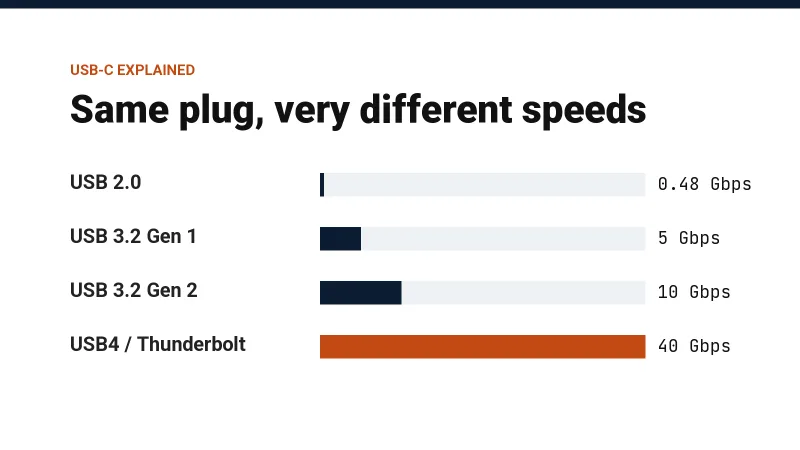
- USB-C with charging, so one charger can do the laptop and your phone
- USB-A for pen drives and a mouse
- HDMI for a TV or projector
Keyboard, build and service
You will type on it every day, so try the keyboard in a shop if you can. Also check whether the brand has a service centre in your city. A quick repair is worth more than a small discount.
Quick picks
| Mostly used for | Look for |
|---|---|
| Study, browsing, documents | Core i5 or Ryzen 5, 16 GB RAM, 512 GB SSD |
| Coding, photo editing | The same, plus a brighter screen |
| Video editing, gaming | A dedicated graphics card, 16 to 32 GB RAM, good cooling |
Get the RAM, the SSD and the screen right, and almost any mid-range laptop from a known brand will last you several years.